Hi everyone, we're mainly looking for feedback and testers for our project, which is currently in beta.
We’ve been working on Safebox, an open-source framework that helps you install, manage, and access self-hosted applications such as Home Assistant, Nextcloud, and Jellyfin etc.
Safebox runs on Linux, macOS, and Windows (supporting both x86 and ARM64 architectures, even Raspberry Pi, Banana Pi hardware also tested). It manages domain and subdomain setup, Let's Encrypt certificates, DNS configuration, and reverse proxy (nginx). It also includes a Wireguard-based remote access feature and a geo-redundant backup system (currently in development).
The project is in beta, and we’re looking for people interested in testing and giving feedback on its usability, stability, features, and really anything else. All information about Safebox and beta testing can be found in our discord channel.
If you’d like to try it out, you can start it with Docker:
docker run --rm -v /var/run/docker.sock:/var/run/docker.sock safebox/framework-scheduler
... Show more...Hi everyone, we're mainly looking for feedback and testers for our project, which is currently in beta.
We’ve been working on Safebox, an open-source framework that helps you install, manage, and access self-hosted applications such as Home Assistant, Nextcloud, and Jellyfin etc.
Safebox runs on Linux, macOS, and Windows (supporting both x86 and ARM64 architectures, even Raspberry Pi, Banana Pi hardware also tested). It manages domain and subdomain setup, Let's Encrypt certificates, DNS configuration, and reverse proxy (nginx). It also includes a Wireguard-based remote access feature and a geo-redundant backup system (currently in development).
The project is in beta, and we’re looking for people interested in testing and giving feedback on its usability, stability, features, and really anything else. All information about Safebox and beta testing can be found in our discord channel.
If you’d like to try it out, you can start it with Docker:
docker run --rm -v /var/run/docker.sock:/var/run/docker.sock safebox/framework-scheduler
Then open: http://localhost:8080/
Website: safebox.network/
Github: github.com/safeboxnetwork/fram…
Discord: discord.gg/aBP8bz6N8J
We’d really appreciate any feedback or ideas for improvement.
Framework scheduler is a lightweight, Alpine-based container that provides task scheduling and service management. - safeboxnetwork/framework-scheduler
GitHub

karashta
in reply to drebora • • •drebora
in reply to karashta • • •jdr
in reply to drebora • • •Very cool looking!
@drebora do you have a list of applications somewhere? I could only find the flashy but inconvenient slideshow on the main page. What the story woth adding more?
I love thse sorts of tools, and have previously used yacht.sh and some custom thing from seedit4me. I even have fond memories of using cPanel/PhpMyAdmin back in the day.
I did try to use yunohost, but it wanted to take over my whole server and I couldn't figure put how to get it to play nice with my other services.
Does anyone have suggestions for similar tools like Safebox but more mature that save me having to individually configure services?
(My current solution is Guix, but that comes with a raft of other problems)
drebora
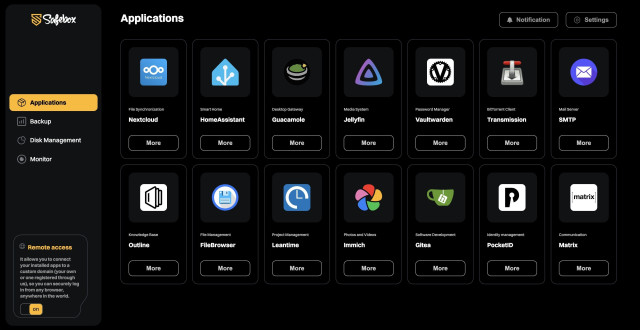
in reply to jdr • • •Yeah, the app list on the website can be a bit confusing since it moves around, we’ll fix that soon. For now, these are the apps you can use in Safebox: Jellyfin, HomeAssistant, Immich, Nextcloud, Guacamole, Leantime, Gitea, Vaultwarden, Transmission, SMTP, Outline, Filebrowser, PocketID
We’re always working on adding more apps and improving existing features, so the list will keep growing over time.
artyom
in reply to drebora • • •drebora
in reply to artyom • • •Thanks for the comment! In older Safebox versions we tried a Docker install script for Debian, but it felt too rigid. Since Safebox is meant to run on pretty much any os, we figured it’s easier for people to just install docker themselves. It’s really simple, and we even cover it in the Safebox install guide.
Also, unlike CasaOS, YunoHost, or Cloudron, which only run on certain OSes, Safebox works on any os as long as Docker is installed, making it much more flexible. That’s basically the "price" we pay for supporting any os.
artyom
in reply to drebora • • •It's definitely not.
Your install guide shows installing Docker Desktop on MacOS in a GUI, which is a strange way to demo server software.
Installing a DE at all is going to lead to complications with sleep modes (ask me how I know), not to mention a bunch of resources and storage for something you're never going to use.
The goal of your software is supposedly to simplify self-hosting but when you support all these other platforms you necessarily complicate things.
Most everyone will be using Debian anyway and there's not really a good reason not to.
drebora
in reply to artyom • • •Thanks for pointing that out, we actually went back and rechecked the whole auto docker install idea because of comments like yours. And yeah, you’re right, most people running this on a real server are using Debian anyway, so having an automatic install there does make sense.
The reason the current guide shows docker desktop on macOS is just because we’re still in beta, and we assumed beginners would try Safebox on a regular desktop first. But we get that it’s not the best example for server software, and we’ll improve that.
We’ve brought back the auto-install script and tested it on Debian/ubuntu/raspbian. If you want to try it out here it is: github.com/safeboxnetwork/fram…
If you notice any issues, we’d appreciate your feedback.
framework-scheduler/README.md at main · safeboxnetwork/framework-scheduler
GitHubartyom
in reply to drebora • • •Phoenixz
in reply to drebora • • •mr_jawa
in reply to Phoenixz • • •drebora
in reply to Phoenixz • • •drebora
in reply to Phoenixz • • •github.com/safeboxnetwork/fram…
It currently supports ubuntu, debian and raspbian.
Thanks, and don’t hesitate to reach out if you run into any issues.
framework-scheduler/README.md at main · safeboxnetwork/framework-scheduler
GitHubGrey Cat
in reply to drebora • • •Based on the screenshot, a critique I would have is how much space is used/wasted per service.
Each card takes a lot of space, not only the padding around the icon + card, but also padding around the name and subtitle. And on top of that the big "More" button.
It does look good, but yeah.
drebora
in reply to Grey Cat • • •Cooper8
in reply to drebora • • •I love this idea, but I agree lack of docker auto-installation as a part of your executable is going to make it harder to convince less techy folks to use, and they (we) strongly prefer a one click installation process at the front end.
Overall though, I love this concept and will give it a shot!
drebora
in reply to Cooper8 • • •drebora
in reply to Cooper8 • • •Currently supporting ubuntu, debian and raspbian.
github.com/safeboxnetwork/fram…
Thanks, and feel free to share any further feedback or remark.
framework-scheduler/README.md at main · safeboxnetwork/framework-scheduler
GitHubCooper8
in reply to drebora • • •warmaster
in reply to drebora • • •The paywall is a problem.
I don't know the solution to your funding, I just know that this one doesn't work for me.