
Press a button and this SSD will self-destruct with all your data
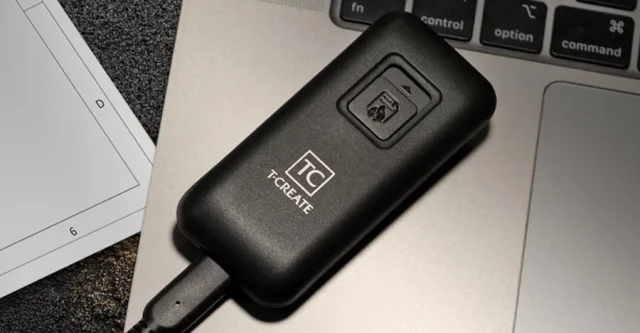
Press a button and this SSD will self-destruct with all your data
TeamGroup’s new T-Create Expert P35S SSD has a two-stage self-destruct button that securely wipes your data and turns the drive into e-waste.Andrew Liszewski (The Verge)
like this

Tolookah
in reply to along_the_road • • •unexposedhazard
in reply to along_the_road • • •Or you could just use an encrypted file system...
If they are willing to torture you for the decryption key, then they are also willing to kill you if you destroy the drive.
pankuleczkapl
in reply to unexposedhazard • • •like this
OfCourseNot and TVA like this.
huquad
in reply to unexposedhazard • • •like this
TVA likes this.
unexposedhazard
in reply to huquad • • •AlchemicalAgent
in reply to huquad • • •passenger
in reply to AlchemicalAgent • • •Kissaki
in reply to along_the_road • • •Help, my cat stepped on the button, how do I recover my data?
Looks like they prevent that.
wicked_samurai
in reply to Kissaki • • •like this
TVA likes this.
Seefra 1
in reply to along_the_road • • •So, let's see if I understand, the device only destroys the data after it's connected to a computer.
So an adversary can just not connect it to a computer and extract the data through alternative means (like unsoldering the chip and reading it directly.
The device should be able to destroy itself either from an internal battery or some physical or chemical mechanism.
NekuSoul
in reply to Seefra 1 • • •My assumption is that it probably uses the same mechanism that most other SSDs already have where it always saves the data with internal encryption and simply overwrites the encryption key when a wipe is requested.
This same mechanism already allows SSDs to be formatted quickly while still being secure without having to zero out everything, which would cause a lot of additional wear.
The additional complete wiping would just be the cherry on top.
like this
TVA likes this.
Sidhean
in reply to Seefra 1 • • •like this
TVA likes this.
sleepundertheleaves
in reply to Seefra 1 • • •So the drive can't start wiping itself unless it's plugged in, but it'll wipe itself completely even if someone detains you and takes the drive and your computer, as long as you have time to hit the button.
Initially I thought this was silly for the same reasons you did, but consider: if you're using proper encryption it's going to be difficult or impossible to decrypt the files on the drive, so the data should be secure even if the drive is stolen, copied, etc.
However, when you're actively using the drive and have files decrypted, and then you lose physical a
... Show more...So the drive can't start wiping itself unless it's plugged in, but it'll wipe itself completely even if someone detains you and takes the drive and your computer, as long as you have time to hit the button.
Initially I thought this was silly for the same reasons you did, but consider: if you're using proper encryption it's going to be difficult or impossible to decrypt the files on the drive, so the data should be secure even if the drive is stolen, copied, etc.
However, when you're actively using the drive and have files decrypted, and then you lose physical access to your devices, you have a problem. IIRC that's how they got Ross Ulbricht's files - monitored him until he unlocked his laptop in a cafe and then grabbed it (and him). If you're worried about that specific threat profile it makes a little more sense to have an easily accessible physical DELETE EVERYTHING NOW button that only operates when the drive is running.
Thought honestly I think this is security theater to make upper management feel like James Bond when giving PowerPoint presentations to external stakeholders, and in that case you want to minimize the possibility of accidental data wiping because the chance you'll need to deliberately wipe the data is almost zero 😆
(And that being said I don't see anything in the user manual explicitly stating "the delete button only works if the drive is connected to a computer", and that seems like a VERY IMPORTANT piece of information to share, so I suspect the delete button does work at all times and the article made a mistake. Shrug 😆)
Seefra 1
in reply to sleepundertheleaves • • •Encryption should always be the last line of defence, encryption that is unbreakable today may be trivially broken tomorrow. Which is why I also I still prefer to overwrite drives with random data instead of just trusting the sanitise command (Even though I know that a big chunk of the data stays unoverwritten as part of the drive's "provisional area".
(Which raises another issue that "deleting" a luks keyslot or the whole header doesn't actually warranty it's deleted, may have just be moved to the provisional area. So if a key somehow is compromised it becomes nessesary to physically destroy the drive.)
... Show more...Encryption should always be the last line of defence, encryption that is unbreakable today may be trivially broken tomorrow. Which is why I also I still prefer to overwrite drives with random data instead of just trusting the sanitise command (Even though I know that a big chunk of the data stays unoverwritten as part of the drive's "provisional area".
(Which raises another issue that "deleting" a luks keyslot or the whole header doesn't actually warranty it's deleted, may have just be moved to the provisional area. So if a key somehow is compromised it becomes nessesary to physically destroy the drive.)
In that case I rather use something that will reboot the computer and shred the ram as it would serve the same purpose with the bonus that contents can't also be recovered from ram. Something like an usb drive with a string wrapped around the wrist.
Now, in the situation that the keys have leaked somehow, (like recording the keyboard from afar while the user types the passphrase) then the self-erasing hard drive makes a lot more sense, assuming the user has time to trigger the mechanism.
Now the issue is, that overwriting even a fast ssd takes time, so I'm assuming the device works by destroying or erasing a security chip that holds the keys for the main storage, however the data is still there if the adversary cuts the power before overwriting the whole drive. Ofc encrypted, but like I said before, encryption may be broken tomorrow. A physical or chemical solution that grinds or dissolves the chip somehow seems to me a better option, with the bonus that it can be made to work without electricity.
Handles
in reply to along_the_road • • •katy ✨
in reply to along_the_road • • •Toes♀
in reply to along_the_road • • •Jul (they/she)
in reply to along_the_road • • •theneverfox
in reply to Jul (they/she) • • •Jul (they/she)
in reply to theneverfox • • •theneverfox
in reply to Jul (they/she) • • •Jul (they/she)
in reply to theneverfox • • •What if the destruction fails, or isn't thorough. Much harder to retrieve information from a partial block of memory if it has also been overwritten with garbage to erase it. Redundancy is essential to security.
A device like that isn't putting enough voltage into it to "melt" it. It you want it that well destroyed you're going to need a high temperature incinerator with a good filter since it's not safe to breath the smoke it will create. Or at the very least a heating element inside it, but then you need layers of heat protection so it doesn't catch everything around it on fire or burn the person pushing the button.
This isn't that. This is meant to destroy the data at a moment's notice with the push of a button. Problem is that it has to be plugged in to do it, which in my mind is defeating the purpose.
theneverfox
in reply to Jul (they/she) • • •I mean, you could probably pick two strategic pins and fry the wells... You might have to do a few of them to make sure that your hit every bank. If you blow through the insulation between them, I can't imagine any method could recover the data. And it shouldn't take much current
The liquid thing was just because... You know, solid state drive
Jul (they/she)
in reply to theneverfox • • •theneverfox
in reply to Jul (they/she) • • •But like... You could just make it physical. Put a couple extra leads on the PCB, charge the capacitor, and let the button close the circuit mechanically. You might have to do a couple tests, but that's better than having storage with a delete button on it
What does a delete button add? It'll take minutes. Might as well put an e-stop button on your desk that connects to your computer by USB
It's basically security theatre
Jul (they/she)
in reply to theneverfox • • •But charge the capacitor with what? That's the point. If it doesn't kill the data immediately upon pushing the button, even when unplugged, it's useless unless some bumbling idiot thief/cop/agent plugs it in before just disarming the button.
And as for fully physical, do tests with what? Another computer? Its a memory storage device with only an I/O driver and basic firmware. There's no CPU to separately run software to detect if the components are destroyed. And if there were, that would have to be physically/electrically separated from the short that is going to kill the device and then physically reconnected, which would mean some kind of mechanical device most likely. Now were getting into a huge device, not a flash drive. The device already has capabilities to read and write data. Very easy to add a chip to give that random data to write over the existing data and a lot less power than a processor and motorized components.
And again, it doesn't solve the redundancy problem. Single point of failure is always going to go wrong at least one in some number of cases. E
... Show more...But charge the capacitor with what? That's the point. If it doesn't kill the data immediately upon pushing the button, even when unplugged, it's useless unless some bumbling idiot thief/cop/agent plugs it in before just disarming the button.
And as for fully physical, do tests with what? Another computer? Its a memory storage device with only an I/O driver and basic firmware. There's no CPU to separately run software to detect if the components are destroyed. And if there were, that would have to be physically/electrically separated from the short that is going to kill the device and then physically reconnected, which would mean some kind of mechanical device most likely. Now were getting into a huge device, not a flash drive. The device already has capabilities to read and write data. Very easy to add a chip to give that random data to write over the existing data and a lot less power than a processor and motorized components.
And again, it doesn't solve the redundancy problem. Single point of failure is always going to go wrong at least one in some number of cases. Even top of the line components and the best quality control available can't beat redundancy and it's way, way cheaper.
heyWhatsay
in reply to along_the_road • • •