
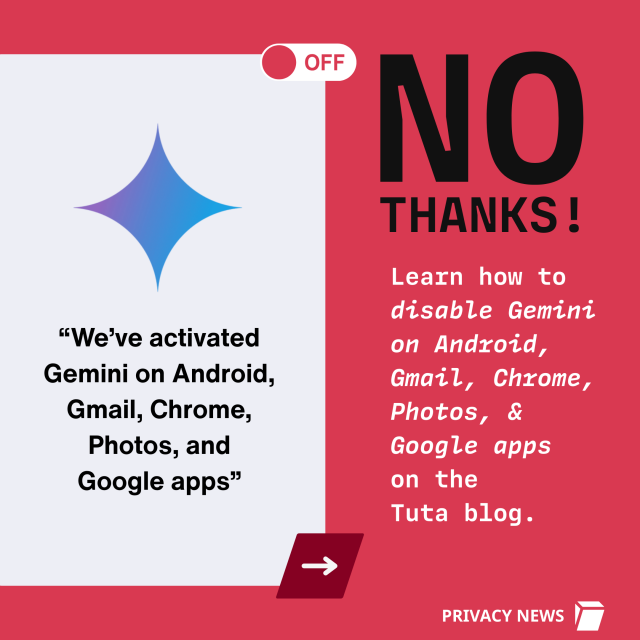
🚨 BREAKING #Google just activated #Gemini on #Gmail - without asking you.
Turn it off now; here's how!
tuta.com/blog/how-to-disable-g…
✊️ Fight AI & fight Google
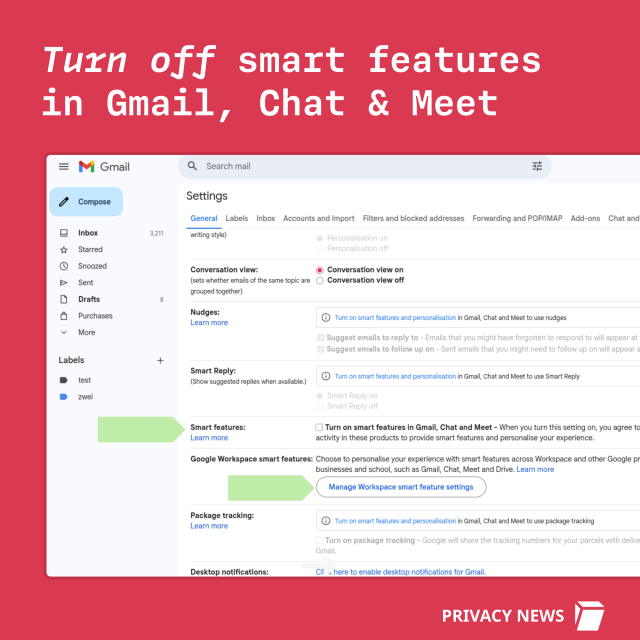
You have to manually turn off Smart Features in the Setting menu in TWO locations.
Share so everyone is aware. ❤️
How to disable Gemini on Android & stop Google accessing your WhatsApp and more. | Tuta
Gemini AI needs to be disabled on Android or it will override your privacy settings and gain full access to your texts, calls, and WhatsApp - even if you’ve turned off Gemini Apps Activity on your phone.Tuta
reshared this

ĞÖKÜ👻👻™
in reply to Tuta • • •Tuta
in reply to ĞÖKÜ👻👻™ • • •sebulon
in reply to Tuta • • •Tumusiime123
in reply to sebulon • • •At me I think the ai work is great! Why do you think it's not that good?
Tuta
in reply to Tumusiime123 • • •Tumusiime123
in reply to Tuta • • •But one can make it not to access location
Jeffrey Rogers 🏴
in reply to sebulon • • •Tuta
in reply to Jeffrey Rogers 🏴 • • •Daltux 🐈⬛
in reply to Jeffrey Rogers 🏴 • • •@sebulon Turn
Tuta
in reply to Daltux 🐈⬛ • • •H4Heights 🇪🇺🇵🇸🇺🇦🇨🇦
in reply to Tuta • • •Luminex
in reply to Tuta • • •kuro
in reply to Tuta • • •Tuta
Unknown parent • • •Erminia Haller
in reply to Tuta • • •Joris Meys
in reply to Tuta • • •To be fair, that setting exists already for quite a while (and I've turned it off ages ago on my gmail account). Good to remind people to check once in a while whether it's still turned off, but it's not like they did this yesterday.
Here's the post from january 2025 about exactly this interface.
workspace.google.com/blog/prod…
Updated smart feature settings to give users more choice and control
Yulie Kwon Kim (Google Cloud)mrteddybear
in reply to Tuta • • •Tuta reshared this.
Tuta
in reply to mrteddybear • • •ĞÖKÜ👻👻™
in reply to mrteddybear • • •Tuta
in reply to ĞÖKÜ👻👻™ • • •ĞÖKÜ👻👻™
in reply to Tuta • • •Pxl Phile
in reply to Tuta • • •Agnès H.
in reply to Tuta • • •LunaticStrayDog
in reply to Tuta • • •Faisal Khan
in reply to Tuta • • •mossman
in reply to Tuta • • •second toot about this today - how is this "breaking" when I already switched it all off the last time it was "breaking" two or three months ago?
(I verified it's all still off...)
Tuta
in reply to mossman • • •mossman
in reply to Tuta • • •New Slang
in reply to Tuta • • •Will share the link with family who need to hear it from "someone else".
Had to go Proton for all bc every time I attempted to sign up w Tuta for a account (paid annually after sign-up) I was flagged as potential abuser. With VPN. W/O VPN. Multiple devices, IPs, and browsers over a two-month period. 🤷🏻
That said, I still appreciate what you do. Disappointing to not have been able to sign up and pay. 💰 Maybe fix that. -Random midwestern parent who likes privacy and technology 👍
Tuta
in reply to New Slang • • •Gitano
in reply to Tuta • • •Anyone who thinks Google gonna honor that setting its a fool.
Google will keep raping everything you put on their servers, like they have being doing forever.
hansup
in reply to Tuta • • •And none of the alternatives is safe as long as billions of people continue to use gmail blindly.
Every mail you sent/receive to/from gmail is a door wide open.
No other option then to block all traffic from gmail accounts.
Angela Miller
in reply to Tuta • • •Tuta
in reply to Angela Miller • • •Tuta
Unknown parent • • •Troed Sångberg
in reply to Tuta • • •Tuta
in reply to Troed Sångberg • • •L. B. Heuschkel
in reply to Tuta • • •@troed
I'm European. It was on. I disabled it per your instructions.
Troed Sångberg
in reply to L. B. Heuschkel • • •@lbheuschkel
I'm surprised this is legal in the EU.
@Tutanota
Tuta
in reply to Troed Sångberg • • •L. B. Heuschkel
in reply to Tuta • • •TarXZ
in reply to Tuta • • •LisaH
in reply to Tuta • • •Unfortunately the Gemini star icon remains active so you can accidentally click on it.
It's a problem on the small top area of the Gmail app on an iphone
MrAptronym
in reply to Tuta • • •I already turned off smart features, anticipating this.
Only use my gmail for trash and unimportant logins though at least
Lukewarm Flystalker 🇨🇦🇧🇧🇲🇽🇬🇱
in reply to Tuta • • •davidosemonti
in reply to Tuta • • •stepheno
in reply to Tuta • • •kikebenlloch
in reply to Tuta • • •To skip potential UX variants this direct link mail.google.com/mail/u/0/#sett… may be a good starting point.
(& don't use evil G's services at all!)
#howTo
Gmail
mail.google.comYQN
in reply to Tuta • • •