
Browser Fingerprinting And Why VPNs Won’t Make You Anonymous
Damn... I guess the next idea is going offline for good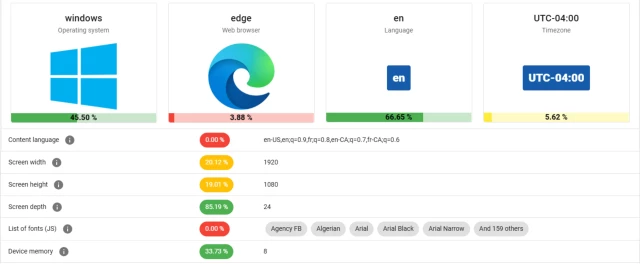
Browser Fingerprinting And Why VPNs Won’t Make You Anonymous
Amidst the glossy marketing for VPN services, it can be tempting to believe that the moment you flick on the VPN connection you can browse the internet with full privacy. Unfortunately this is quit…Hackaday

Mikelius
in reply to BeatTakeshi • • •I disagree.
There seems to constantly be two sides of the privacy discussion with public VPN options and they're both wrong on their own. It's correct that using a VPN on its own is not enough to keep you private online, fingerprinting being one example to why. However, not using a VPN but having no identifiable browser fingerprint doesn't either, since your IP is still a fingerprint too.
I like to give the following analogies:
1. Doing only an oil change on your vehicle but no other maintenance won't keep your vehicle running forever
2. Doing all vehicle maintenances except oil changes won't keep your vehicle running forever
If the goal is to be private, remember that a VPN is only one tool in a very large tool belt.
Tatar_Nobility
in reply to Mikelius • • •Mikelius
in reply to Tatar_Nobility • • •Tor is definitely another option. For my personal use however, I have my entire network covered by a VPN so all outgoing traffic uses it.
I'm sure I could setup Tor to do the same, but I imagine my family and I would get blocked more heavily on sites, as well as get our bank accounts and such flagged or something.
Like many things, it obviously depends on your threat model.
Auli
in reply to Mikelius • • •a_non_monotonic_function
in reply to Auli • • •SteveCC
in reply to BeatTakeshi • • •Seems like there could be tools to mess around and change browser fingerprints periodically. No?
RheumatoidArthritis
in reply to SteveCC • • •There's this but it blocks only one of the many methods voyeurs use.
addons.mozilla.org/en-US/firef…
Canvas Defender – Get this Extension for 🦊 Firefox (en-US)
addons.mozilla.orgMonkderVierte
in reply to RheumatoidArthritis • • •jimi_henrik
in reply to SteveCC • • •It could be done on the browser level (maybe it's something browsers like LibreWolf do), however, it would break sites that require the fingerprints to be the same for "security reasons" which may or may not be a legitimate claim.
You could say "well, I'm not going to use that particular website then", but the problem is that there are less and less websites that don't require these technologies to function properly.
PowerCrazy
in reply to jimi_henrik • • •jimi_henrik
in reply to PowerCrazy • • •Off the top of my head, no. What I do remember is that I couldn't use Librewolf as my daily browser because I had trouble using every other website. Might be an exaggeration, and it could have been due to other factors, not just resisting fingerprinting.
I've just come across this article: kevinboone.me/fingerprinting.h…
The author describes the situation pretty well:
... Show more...Off the top of my head, no. What I do remember is that I couldn't use Librewolf as my daily browser because I had trouble using every other website. Might be an exaggeration, and it could have been due to other factors, not just resisting fingerprinting.
I've just come across this article: kevinboone.me/fingerprinting.h…
The author describes the situation pretty well:
Kevin Boone: The privacy nightmare of browser fingerprinting
kevinboone.mepumpkin_spice
in reply to SteveCC • • •brucethemoose
in reply to SteveCC • • •Already done, see: github.com/uazo/cromite
When I go to the fingerprint test, a bunch of the values like canvas resolution and timezone are randomized.
...Not everything, though.
GitHub - uazo/cromite: Cromite a Bromite fork with ad blocking and privacy enhancements; take back your browser!
GitHubPiraHxCx
in reply to brucethemoose • • •brucethemoose
in reply to PiraHxCx • • •Yeah, exactly.
Cromite's explicit focus is, literally, antifingerprinting. With the goal of breaking cross site tracking I guess.
A more accurate goal for Tor/Mullvad is anonymizing, e.g. “blending in with the crowd.”
It’s like radically changing your clothes every day vs wearing super incognito stuff. Different means, each more optimal for different aspects of security/privacy.
Twongo [she/her]
in reply to BeatTakeshi • • •Here are some extra tips for increased privacy:
- Don´t use your browser in fullscreen
- Download Chameleon for Firefox, it periodically changes the browser and OS it pretends to be
OR: Use Chameleon and set yourself to the most common combo. Get lost in the noise.
AsoFiafia
in reply to Twongo [she/her] • • •Twongo [she/her]
in reply to AsoFiafia • • •AsoFiafia
in reply to Twongo [she/her] • • •Thanks! I had no idea. I figured the resolution came from system specs. This is good to know. Although, I’m super close to just banishing the internet entirely. Tracking is getting out of hand…
Edit: corrected “vanishing” to “banishing.” Autocorrect. 🙄
BeatTakeshi
in reply to Twongo [she/her] • • •Twongo [she/her]
in reply to BeatTakeshi • • •randomlzing your window size shows trackers different resolutions.
depending on which OS you use it won't show 1920x1080, as taskbars and other extras take off a few pixels.
example: if your browser is fullscreen and only shows a resolution of 1920x1075 it could most likely mean you use macos (randomly chosen)
jnod4
in reply to Twongo [she/her] • • •Xylight
in reply to Twongo [she/her] • • •FoundFootFootage78
in reply to BeatTakeshi • • •Just use Tor or Mullvad browser (you don't need to use the Tor Network or Mullvad VPN, you can bring your own).
That said the wasted screen real-estate is a dealbreaker for me. So if I'm not gonna log in then I'll go with a fully separate installation.
Steve
in reply to BeatTakeshi • • •They secure your data while in transit to/from the exit node. Maybe that's your job so you can access their LAN. Or it's a public VPN that secures your dada from the local WiFi or ISP you're directly connected to. That's all it's built for.
Auli
in reply to Steve • • •Steve
in reply to Auli • • •It only encrypts the data within the HTTPS packet. But where that packet is going is still transparent.
It also doesn't do anything for non web traffic. Email through SMTP or IMAP, FTP, lots of things don't use HTTP at all.
Eager Eagle
in reply to BeatTakeshi • • •no shit
I use VPN because of the ISP and the network, not to become anonymous to the websites I visit.
bountygiver [any]
in reply to Eager Eagle • • •PiraHxCx
in reply to BeatTakeshi • • •primalmotion
in reply to PiraHxCx • • •PiraHxCx
in reply to primalmotion • • •partygap
in reply to BeatTakeshi • • •don’t browse the web and actually get some work done
WEB IS HARMFUL!!!
Firefox
harmful.cat-v.orgZerush
in reply to BeatTakeshi • • •VPNs add an privacy layer, but dont avoid fingerprintings, used as extension can't avoid that the browser connect first to the ISP before the VPN can create the tunnel, with which it may serve to skip country restrictions, but you are still seen by your ISP. It don't also blocking the fingerprinting, except the IP.
To stay private depends more on other measures, DNScrypt, not to use apps, search engines and services which logs/share our activity, using ad/t... Show more...
VPNs add an privacy layer, but dont avoid fingerprintings, used as extension can't avoid that the browser connect first to the ISP before the VPN can create the tunnel, with which it may serve to skip country restrictions, but you are still seen by your ISP. It don't also blocking the fingerprinting, except the IP.
To stay private depends more on other measures, DNScrypt, not to use apps, search engines and services which logs/share our activity, using ad/trackerblocker.... and the most important, common sense, not a tin foil hat. PEBCAK
Shamot
in reply to BeatTakeshi • • •FriendBesto
in reply to BeatTakeshi • • •This is a bit of a misnomer. No one PC can be fully anonymized or fully private, even if the PC provided fake data points, they will still be technically fingerprinted. Having said that, having a browser that tries to spoof stuff like LibreWolf, Tor or IronFox is decent.
The gains in using a VPN, among other best practices is that helps --assuming people do not log on to something like Google-- is to minimize the fingerprint of the PC to you, as a user. Assuming one trust their VPN provider, helps.
Tor leverages the point of having all users look and be fingerprinted mostly as the same, so you get lost in the shuffle and crowd.